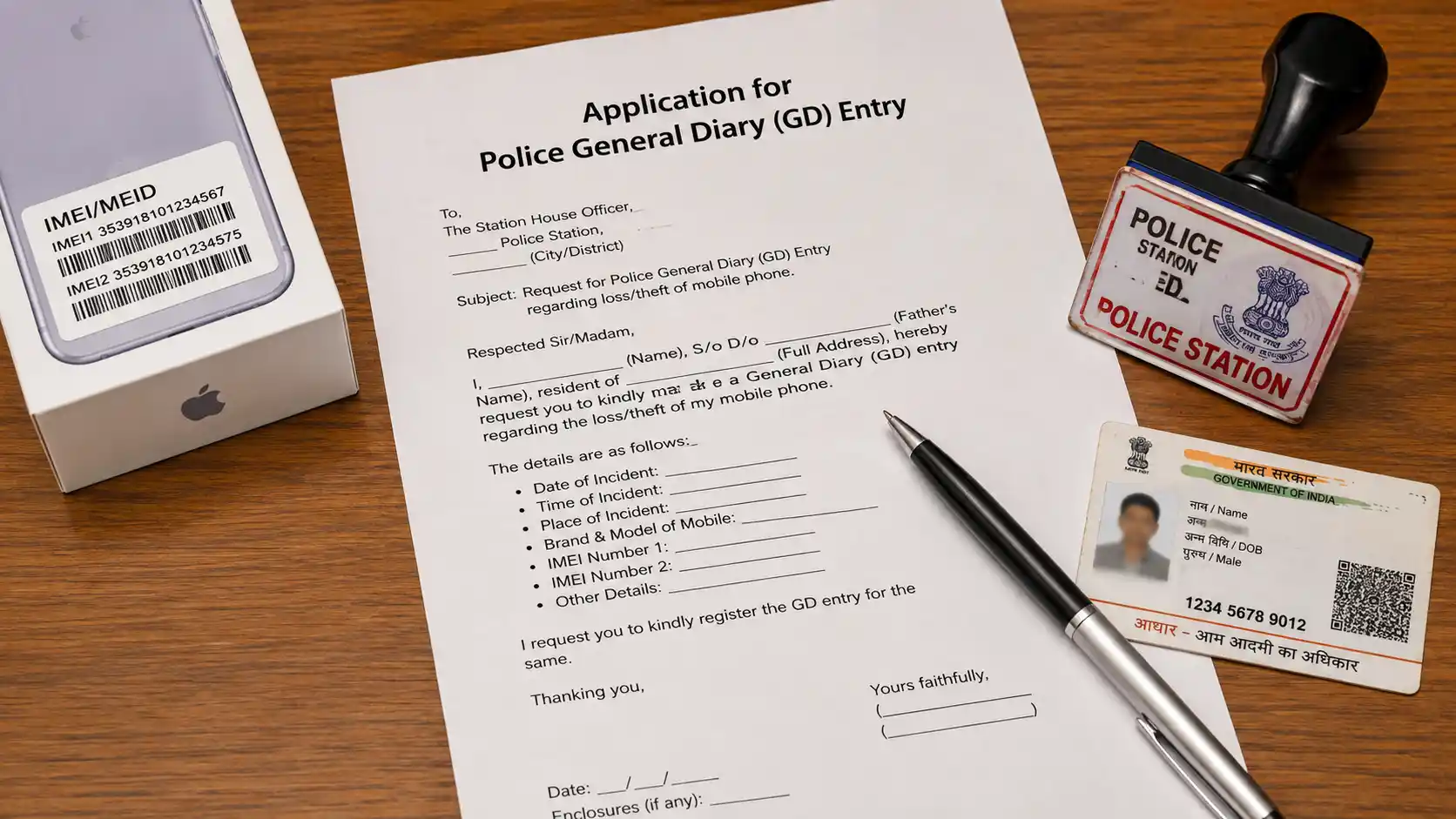
Losing an important personal belonging—whether it is your smartphone, original educational marksheets, Aadhaar card, PAN card, driving license, or wallet—is a stressful experience. Beyond the immediate inconvenience, losing identity documents or a mobile phone carries a serious risk: impersonation and misuse by cybercriminals or identity thieves.
If someone finds your lost mobile SIM card or Aadhaar card and uses it to commit financial fraud or illegal activities, law enforcement officers will initially track the registered owner—YOU.
To protect yourself from legal liability and obtain official duplicate documents (or a replacement SIM card from telecom providers like Jio, Airtel, or Vi), Indian law mandates filing an official report with the police department.
This report is formally known as a Police General Diary (GD) Entry or a Lost Property Report.
A Police GD is not a criminal complaint or First Information Report (FIR). It is an official record in the daily logbook of a police station establishing that a specific item was lost without any criminal foul play or theft suspected at the time of reporting.
In this practical, action-oriented legal guide, we explain the difference between a GD and an FIR, detail online lost report portals across Indian states, provide two free ready-to-use Police GD application formats (for Lost Mobile Phone and Lost Certificates/Wallet), and explain how to block lost phones on the government's CEIR Portal (ceir.gov.in).
Police GD vs. FIR: What is the Difference?
Understanding whether you need to file a General Diary (GD) entry or a First Information Report (FIR) is essential when visiting a police station:
| Parameter | General Diary (GD) / Lost Report | First Information Report (FIR) |
|---|---|---|
| Nature of Incident | Missing or lost items without crime suspected (e.g., mislaid phone, lost wallet). | Cognizable crime committed (e.g., snatching, burglary, robbery, assault). |
| Purpose | Legal proof of loss to obtain duplicates / replacement SIM card. | Investigation and arrest of accused criminals by police. |
| Court Mandate | Does not require court trial or investigation. | Triggers official police investigation and chargesheet. |
| Filing Complexity | Quick and simple; can often be done online in minutes. | Requires detailed police statement and formal registration. |
Why Filing a Police GD Immediately is Essential
- Mandatory for Duplicate SIM Card Re-issuance: Telecom operators (Airtel, Jio, Vodafone Idea, BSNL) require a stamped copy of a Police GD / Lost Report before re-issuing a replacement SIM card for your lost mobile number.
- Re-issuance of Educational & Government Documents: Universities, CBSE/ICSE boards, RTOs, and UIDAI mandate a certified Police GD copy before processing duplicate degree certificates, marksheets, driving licenses, or RC books.
- Protection Against Identity Misuse: If a lost document or SIM card is misused in cyber crime or illegal activities, your stamped Police GD acts as conclusive legal proof that you lost possession prior to the incident.
- Insurance Claim Requirement: Insurance companies require an official police lost report before processing claims for lost gadgets, laptops, or insured valuables.
Template 1: Police GD Application Format for Lost Mobile Phone & SIM Card
Use this format when filing an offline application at your local police station for a lost mobile phone, smartphone, or SIM card.
APPLICATION FOR POLICE GENERAL DIARY (GD) ENTRY (Regarding Lost Mobile Phone & SIM Card)
TO: The Officer-in-Charge / Inspector of Police, [Name of Police Station, e.g., Connaught Place Police Station] [City / District Name, State] [PIN Code]
Date: [Insert Date]
SUBJECT: Application for General Diary (GD) entry regarding loss of Mobile Phone and SIM Card.
Respected Sir/Madam,
I am writing to formally report the loss of my mobile phone and SIM card, which occurred on [Date of Loss] at approximately [Time, e.g., 04:30 PM].
1. PARTICULARS OF THE APPLICANT:
- Full Name: [Your Full Legal Name]
- Father’s / Husband’s Name: [Insert Name]
- Residential Address: [Your Complete Home Address]
- Contact Phone Number: [+91-XXXXXXXXXX] (Alternative contact number)
- Email Address: [Your Email ID]
2. DETAILS OF THE LOST MOBILE PHONE & SIM CARD:
- Mobile Make & Model: [e.g., Samsung Galaxy S23 / iPhone 15 / Redmi Note 12]
- IMEI Number 1: [15-digit IMEI Number 1]
- IMEI Number 2: [15-digit IMEI Number 2]
- Lost Mobile Number: [+91-XXXXXXXXXX]
- Telecom Service Provider: [Jio / Airtel / Vi / BSNL]
- Approximate Value: Rs. [Device Value]/-
3. INCIDENT DETAILS: On [Date], while traveling from [Location A] to [Location B] via [mode of travel, e.g., public bus / metro / walking near Market Area], my mobile phone fell out of my pocket / was mislaid inadvertently. Despite thorough searches in the surrounding area, I could not trace the device.
I suspect the phone was lost due to negligence and there is no suspicion of snatching or physical assault.
4. PRAYER: I request you to kindly record a General Diary (GD) entry regarding this loss in the police records and issue me a stamped certified copy of the GD entry to enable me to obtain a duplicate SIM card from my service provider and block the device on the CEIR portal.
Thanking you.
Yours faithfully,
(Signature) [Your Full Legal Name]
Enclosures:
- Copy of Mobile Invoice / Bill showing IMEI Number.
- Copy of Government ID Proof (Aadhaar Card / Voter ID).
Template 2: Police GD Application Format for Lost Documents, Marksheets & Wallet
Use this format when reporting lost original educational marksheets, passport, Aadhaar card, PAN card, driving license, or wallet.
APPLICATION FOR POLICE GENERAL DIARY (GD) ENTRY (Regarding Lost Certificates / Identity Documents / Wallet)
TO: The Officer-in-Charge / Inspector of Police, [Name of Police Station] [City, State, PIN Code]
Date: [Insert Date]
SUBJECT: Application for Police GD entry regarding loss of original educational certificates / identity documents.
Respected Sir/Madam,
I, [Your Full Name], residing at [Your Residential Address], wish to report the loss of my original documents/certificates which occurred on [Date of Loss].
1. DETAILS OF LOST DOCUMENTS / ITEMS:
Sr. No. Document / Item Name Issuing Authority / Document No. Particulars 1. Original Class 10th / 12th Marksheet CBSE / State Board (Roll No: XXXXX) Original Certificate 2. Original Degree Certificate [Name of University] Reg No: XXXXXX 3. Original Aadhaar Card / PAN Card UIDAI / Income Tax Dept ID No: XXXXXXXX 4. Leather Wallet containing Cash Containing approx Rs. 1,500 cash & cards Black Wallet 2. STATEMENT OF FACTS: On [Date] at around [Time], while traveling near [Location Name], the folder/bag containing the above-mentioned original documents was inadvertently left behind or misplaced. I searched the area thoroughly, but the documents could not be recovered.
There is no suspicion of criminal theft or robbery. The documents were mislaid accidentally.
3. PRAYER: I request your good office to kindly register a General Diary (GD) entry regarding this loss and issue me a certified stamped copy of the same so that I may apply for duplicate certificates to the concerned issuing authorities.
Thanking you.
Yours sincerely,
(Signature) [Your Full Legal Name] [Contact Mobile Number]
Enclosures:
- Photocopies of the lost certificates / documents (if available).
- Copy of Aadhaar Card / ID Proof.
How to File a Police GD Online Across Major Indian States
Most Indian state police departments now provide Lost Property Report filing online, eliminating the need to physically visit a police station:
[Visit State Police Portal / App] ➔ [Select 'Lost Report' Service] ➔ [Enter Details & IMEI/Doc No.] ➔ [Download Stamped Digital PDF Receipt]
| State / City | Official Portal / Mobile App | Service Name |
|---|---|---|
| Delhi / NCR | Delhi Police Lost Article App / lostfound.delhipolice.gov.in |
Lost Report Registration |
| Maharashtra (Mumbai) | Mumbai Police Citizen Portal | Lost & Found Information |
| West Bengal (Kolkata) | Kolkata Police Citizen Portal (kolkatapolice.gov.in) |
Online GD Entry |
| Uttar Pradesh | UPCOP Mobile App / UP Police Portal | Lost Article Report |
| Tamil Nadu | TN Police Citizen Services App | Lost Document Report (LDR) |
| Karnataka | E-Lost Report App (KSP) | E-Lost Report Registration |
How to Block Your Lost Phone Nationally via CEIR Portal (ceir.gov.in)
The Government of India operates the Central Equipment Identity Register (CEIR) under the Department of Telecommunications (DoT) to block lost or stolen mobile phones across all Indian telecom networks:
- Step 1: File a Police GD (online or offline) and obtain the GD Reference Number.
- Step 2: Obtain a duplicate SIM card for your lost mobile number from your service provider.
- Step 3: Visit
https://ceir.gov.inand click on "Block Stolen / Lost Mobile". - Step 4: Fill in your 15-digit IMEI numbers, mobile number, lost date/location, and upload a PDF copy of your Police GD receipt and purchase invoice.
- Step 5: Submit the form. The central portal blocks your IMEI across all Indian networks within 24 hours, rendering the device completely useless to anyone who finds it.
Checklist: What to Take to the Police Station
If filing an offline GD entry at a physical police station, carry this complete document folder:
- Two Printed Copies of the Application: One copy for police submission and one copy to get an official stamped acknowledgement receipt.
- Device Purchase Invoice / Bill: Proof of mobile purchase containing the 15-digit IMEI number.
- Photocopies of Lost Documents: If reporting lost educational certificates, carry photocopies of the lost marksheets if available.
- Government Photo ID Proof: Self-attested copy of your Aadhaar Card, Passport, or Voter ID.
Conclusion
Filing a Police General Diary (GD) entry immediately after losing a mobile phone, SIM card, or original educational certificates is an essential administrative safeguard. By utilizing the free application formats provided above or filing online through state police portals and the CEIR portal, you secure legal proof of loss, protect yourself against identity misuse, and easily obtain duplicate documents.
*Disclaimer: This blog post and downloadable application templates are provided strictly